

Send personalized times in seconds, instead of an impersonal booking link or a hand-typed list.
“I think Slots is where you've given me my life back. It's the magic of not typing in all of these times into an email body manually.”
See overlapping working hours across up to five time zones at once, with zero tab switching.
“I feel like I look like a boss when I can send really complicated timezone calculations back to someone in less than five minutes.”

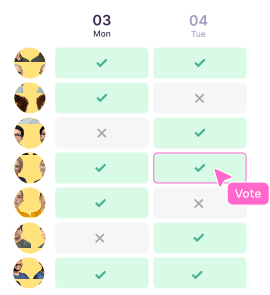
Let a large group vote on proposed times and add context, all in one live, shared view.
Do calendar audits in minutes, not weeks, and show your exec exactly how much time you've given back.


Vimcal EA is a calendar built for Executive Assistants. It works on top of Google Calendar and Outlook and adds tools for the hardest parts of the job: sharing availability (Slots), juggling time zones (Time Travel), scheduling large groups (Group Spreadsheets), and reviewing an executive's calendar (Calendar Audit).
Yes. Vimcal EA works on top of both, and changes sync back to your existing calendar, so your executives don't have to change how they work.
Yes. Executive profiles give each executive their own tab with separate preferences and time zones, so you can switch between the people you support without losing context.
Select times with Slots and choose the recipient's time zone. The text you copy is already converted, and Time Travel shows up to five time zones side by side while you pick.
It depends on how much scheduling you do. Executive Assistants at Clay save at least an hour a day, and Zapier's EA team saves up to five hours a week.
Yes. Vimcal EA comes with a free 14-day trial, and every EA gets a 1:1 onboarding call.