Outlook is your foundation. Vimcal EA is your upgrade.

You’ve spent years mastering Outlook. Vimcal EA makes sure it doesn’t slow you down.
Book an intro call
 Free 14-day trial

Outlook is an email tool with a calendar. Vimcal EA is a calendar tool specifically built for EAs.

Outlook handles the basics, but executive scheduling requires more.
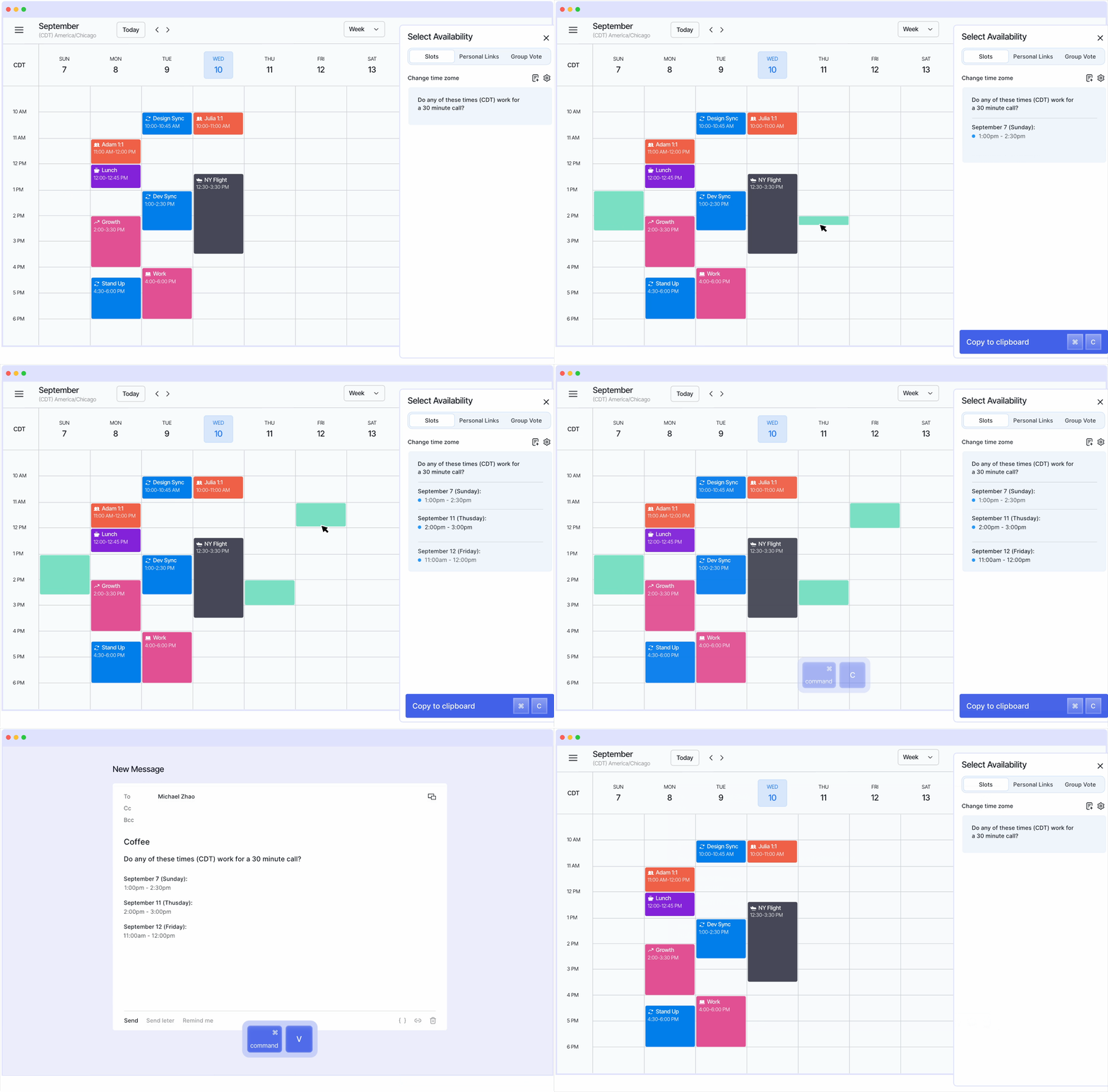
Vimcal EA adds drag-to-share availability, auto-deleting holds, multi-exec profiles, and calendar audits on top of your existing Outlook setup.
No switching required.

Scheduling

Slide to explore the list
Key features
Outlook
Vimcal
Sharing availability
Type times manually into email
Drag, format, paste in seconds
Calendar holds
Manual create and delete for every option you propose
Auto-create when proposing, auto-delete on booking
Time zones
See 3 time zones on the classic desktop
5 side by side with overlapping working hours visible
Multi-exec management
Toggle between accounts, permission issues
Dedicated profiles in one view

Coordination

Slide to explore the list
Key features
Outlook
Vimcal
Large meeting coordination
Scheduling Poll works but EAs can’t see external availability and there's no way to add context or notes
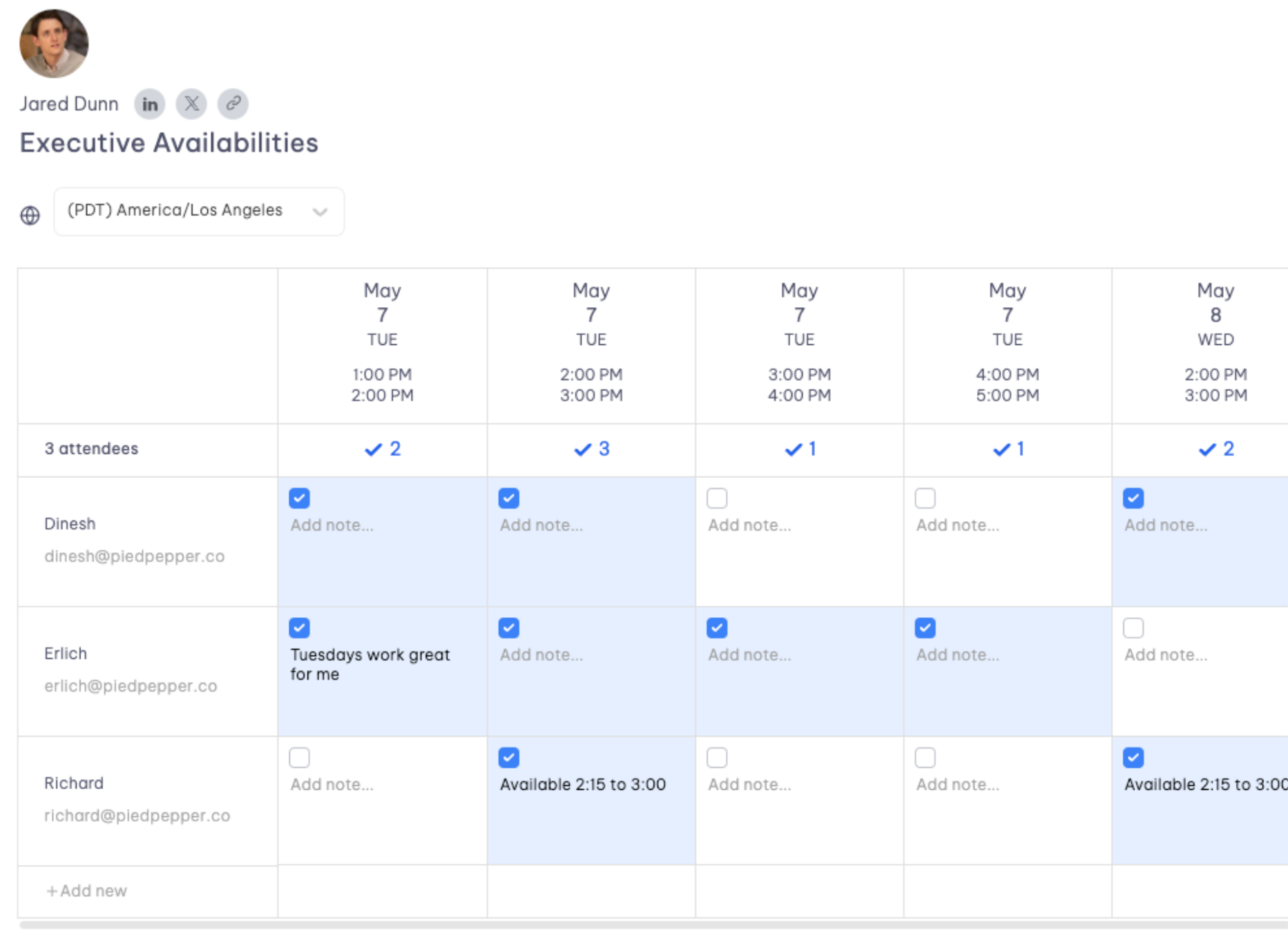
Live spreadsheets where EAs propose times, vote, and add notes, all in one place
External coordination
Limited visibility into external calendars
Overlay anyone’s calendar to find common availability, even outside your org

Scheduling

Slide to explore the list
Key features
Outlook
Vimcal
Calendar analytics
Viva Insights (tracks your personal meeting habits, not your exec’s calendar. Requires a separate license)
Calendar Audits built for EAs: filter your exec’s meetings by type, duration, and frequency. One-click export
Weekly metrics
Auto-generated for each exec
Meeting breakdown by type
Viva Insights sorts by generic categories (long, large, recurring, 1:1). No filtering for a specific exec
Filter your exec's calendar by internal vs. external, recurring vs. one-off, attendee count, color tags, and export it all in one click
Multi-exec management
Toggle between accounts, permission issues
Dedicated profiles in one view

Speed

Slide to explore the list
Key features
Outlook
Vimcal
Keyboard shortcuts
Limited
Full keyboard-first design
Event creation
Multiple clicks
Natural language + command center
EAs from startups to Fortune 500 companies use Vimcal EA to get more out of their Google Calendar

Vimcal EA doesn’t replace your Google Calendar. It works on top of it.

Connect your Outlook Calendar

Two clicks. Everything syncs both ways. Your execs don’t need to do a thing.

Add your executives

Create a profile for each exec with their own calendars, time zones, and preferences.

That’s it. Start scheduling

Slots, time travel, calendar audits, group polls, and auto-deleting holds are all live from day one.

The most loved Vimcal EA features among Outlook EAs

Slots

Drag available times on your calendar, and they’re formatted and ready to paste into any email.
Holds auto-create and auto-delete.
You don’t have to type your exec’s availability manually (ever).

Group Spreadsheets

Coordinate meetings between multiple execs across companies in one live spreadsheet.
EAs propose times, vote, and add context without a single email chain.

Time Travel

Search any city, see five time zones side by side.  Overlapping working hours are highlighted instantly.
Pair it with Slots to send times in any recipient’s local zone.

Give your Outlook the upgrade it’s been waiting for.

By clicking “Accept All Cookies”, you agree to the storing of cookies on your device to enhance site navigation, analyze site usage, and assist in our marketing efforts. View our Privacy Policy for more information.