




A continuous battle EAs fight is convincing their executive partners that they can’t magically add time to their calendars that…doesn’t exist. And it’s not us saying that. It’s EAs. All. Across. Reddit.
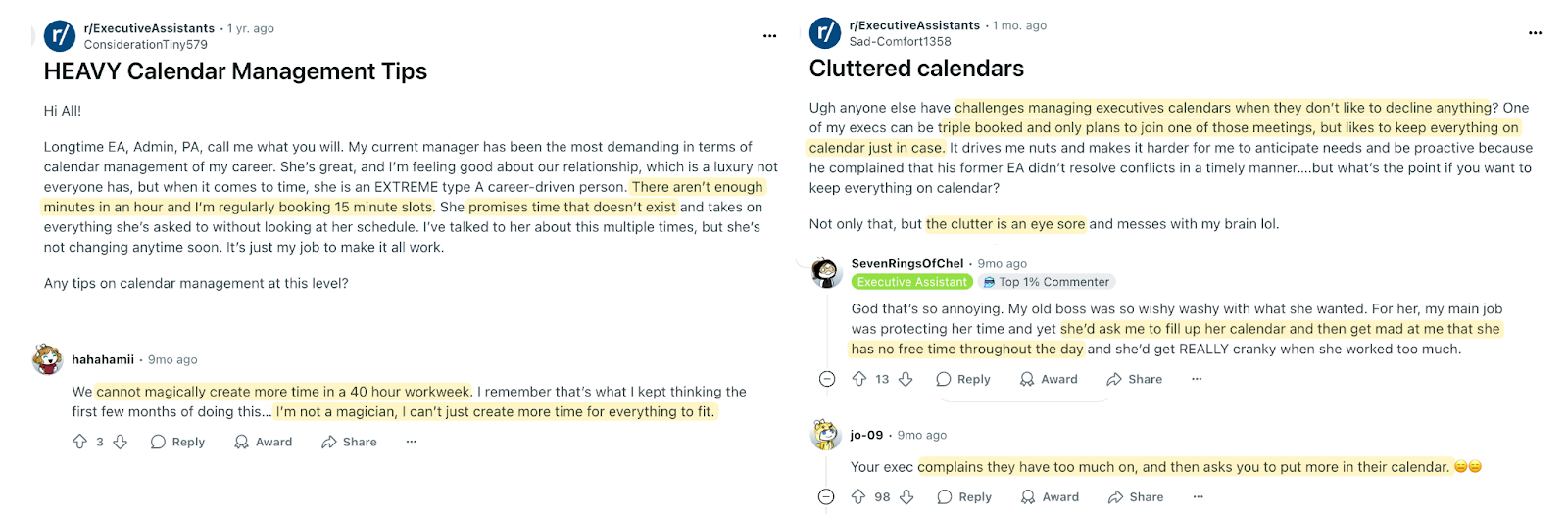
One great solution to help your exec partners ace calendar management (and make your job easier) is doing a calendar audit. It’s the process of showing your exec where they spend their time, how closely it aligns with their priorities, and proposing changes that help them meet their goals.
Even if you’re one of the lucky few whose executive sticks to the calendar, doing a calendar audit can be eye opening. It can help your exec reflect on how they’re spending their days and identify time sucks. And this, in turn, enables you to create more impact in your role as an EA.
By the end of this article, you’ll know exactly how to conduct a calendar audit that not only highlights time wasted in meetings but also gives you actionable steps to reclaim hours for your exec and make your life as an EA less reactive, more strategic, and infinitely less stressful.
But if you’ve never done a calendar audit before, it can be overwhelming. Where do you begin? How do you analyze the data and find the takeaways that you can actually ask your exec to implement? In this article, I’ll share a step-by-step guide on how to conduct a calendar audit for your executive(s).
What is a calendar audit (and why you need it)
Simply put, a calendar audit is a document that neatly summarizes how your executive is spending their time and what they can do to regain more hours back in their day.
For example, If your exec sees they’re spending 10+ hours a week in internal meetings, they can cut the ones where their presence isn’t essential. That reclaimed time can instead be spent on more impactful activities that’ll help achieve business goals.
Now, I know you already do enough for your executive. Do you really need to conduct a calendar audit as well? Yes, and here’s why:
- Calendar audits can help your exec reflect on their scheduling habits. If you’re struggling to collaborate with your executive regarding managing their schedule, calendar audits can be a godsend.
Instead of trying to highlight that they need to stop overscheduling, avoid conflicting meetings, etc., you can arm yourself with data and say, “You’re spending 8-10 hours in unplanned meetings every week, leading to essential tasks getting postponed.”
The calendar audit data gives significant weight to scheduling conversations and helps you make abstract time visible. - Calendar audits can help you create a more solid impact in your role. It’s hard to quantify how much you do as an EA because so much of the work is invisible, despite being so difficult.
Calendar audits are the number one thing you can use to prove your impact. Imagine saying you’ve helped your exec save 389 hours per year using calendar audits. That’s exactly what Courtney Johnson did.
Doing regular calendar audits can not only help your exec do a better job, but also help you prove that you are their indispensable strategic partner. - Your executive has a light calendar with few meetings each week. If your exec has a handful of meetings each week, you probably don’t need to do a full audit to determine time-savers. Either those meetings are already the necessary ones, or you can determine whether they’re essential using simple observation, without requiring deep auditing.
- Your exec only has too many meetings in short crunches. During some periods, such as launches or fundraising, it’s expected that your executive will have a calendar full of meetings. A calendar audit is used to identify patterns, and if the calendar is only temporarily disorganized, a full audit may not be necessary.
- Your exec has a single focus role. If you work with an exec who already has a lot of time for deep work (like a technical co-founder who mostly codes), there’s nothing to optimize for in their calendar.
The reality is most EAs don’t fall into the very specific camps above. But if you manage multiple EAs, it might be worth evaluating if all of them need a calendar audit.
For EAs with execs stuck in too many meetings, calendar audits pull them out of the weeds and into the bigger picture. Which meetings can be cut short or eliminated? What external meetings usually lead nowhere? Which meeting can be cut to make room for more personal or focus time for your executive?
Instead of being reactive to your exec’s needs, audits help you take a step back and be more proactive. Over time, this will translate to an executive who has some breathing room in their day.

Now the next question comes: How do I actually do an audit?
How to conduct a calendar audit in 5 steps
I won’t sugarcoat it: Doing a calendar audit manually can be back-breaking work. It requires a lot of color-coding, spreadsheets, copy-pasting, checking if everything’s exported right in your sheet, and other tedious tasks. But it can be done. You just need to build a system that works for you. Here’s a step-by-step guide:
Step 1: Understand your executive’s goals and preferences
You can’t reach anywhere if you don’t know where you want to go. The foundation of a calendar audit is knowing what your exec’s goals are. Identify the top things that they want to achieve over the next month or quarter.
For example, they may say they need to allocate more time to chat directly with customers and understand their pain points. Now you know meetings with customers need to take #1 priority.
When you have clarity on what your exec wants to achieve, you can use the calendar audit data to understand how close or far you are from accomplishing that goal.
If your executive doesn’t have the time to discuss their goals right now, a Redditor has given a handy question template you can use before you start compiling and analyzing the numbers:
“As I compile the data, is there anything you really are looking for or want me to report on? Currently, I am taking stock of X, but don't want to miss anything or compile information that’s not useful.”
The above statement will help your exec pinpoint which data points are actually useful for them and why. This, in turn, will help you get a solid understanding of their goals, which you can continue to use for future audits.
After goals come preferences. Some execs prefer to collate all meetings for later in the day and have their Friday afternoons free. Others might work better with meetings spread throughout the day and work more at night. An EA on Reddit summed it up perfectly:
“Ask the exec what they like/dislike. When I first started my current job, I asked the execs what they don’t like about their current calendar, how they’d like it to look instead, and certain things that they need. My execs like to have a 15-minute buffer between Zoom meetings, so I always make sure to schedule anything back to back with those 15 minutes in between. One of my execs is very strict about working within 9 to 5 hours, while the other is totally fine working later if it means her day doesn’t feel as insane.”
Knowing your executive’s preferences will help you not only schedule meetings according to their liking, but also audit whether the current calendar matches their ideal day.
Step 2: Export your exec’s calendar into a spreadsheet
The second step is to compile all the meetings your executives had within a set period into a spreadsheet. You can also export calendars using an extension like Sheets2GCal. Most EAs do calendar audits quarterly (which is the perfect sweet spot for this activity), but you can also do them monthly or weekly.
I’ll warn you that this process sounds simple, but it can be extremely cumbersome. For starters, many EAs complain that the export process doesn’t successfully capture all of the meetings.

This could be because deleted or old meetings sometimes vanish from the dataset. Sometimes, recurring meetings with no end date also disappear when you export. Here are some pro tips to get as accurate data as possible when you export your exec’s calendar:
- Preserve old/canceled meetings instead of deleting them
- Export in small chunks (like quarterly) for faster processing
- Add all recurring meetings with an end date
Here’s a more detailed guide on how to export your Outlook calendar to Excel.
Once you’re done exporting meetings, clean up your spreadsheet. Delete the columns you don’t need and add additional notes if you need them. For example, if your exec time blocks everything, including personal time, you’ll likely want to delete those times from your dataset. Similarly, you might want to flag external meetings with contractors and vendors to note how many of those are done in a time period.
Step 3: Categorize different meetings
With all the raw data at your disposal, put on your analyst hat and start categorizing the meetings. Here are some categories you could use:
- Internal vs. external meetings
- Recurring vs. one-off meetings
- Strategic vs. operational meetings
- Attendees with 2 participants vs. 5+ participants
Categorizing your meetings can be extremely easy using color-coding. But the key is consistently using the colors you’ve assigned, as one EA says:
“Every person I’ve supported has a different color coding system. My brain vividly remembers the first calendar I supported, so teal will always be “travel block,” and red will be “meetings with the boss.” But I’ve had some execs have a color for recurring meetings, or a color for virtual vs in-person meetings, or a color for personal meetings. There are so many ways to designate, but consistency is key.”
Need inspiration? Here’s an EA sharing how she prefers to color code her executives’ calendars.
The catch here is you might not be able to export the colors you’ve assigned in a CSV file. So there’s not going to be a “color category” column in your spreadsheet by default. In this case, you may need to apply filters in your calendar and then manually enter the information into your spreadsheet.
Right about now, if you’re scratching your head, wondering if there’s no AI tool, no robot that can do this, hold up. There is. Vimcal EA has a calendar audit feature specifically designed for you.
- It layers on top of your Outlook or Google Calendar. So don’t worry, you don’t need to add yet another calendar to the mix. Vimcal just makes your existing calendars more powerful. And yes, you can add multiple execs in your account if you’re managing more than a single calendar.
- It makes meeting categorization buttery-smooth. You can filter for color-coded meetings, internal vs. external meetings, recurring vs. non-recurring meetings, and minimum vs. maximum attendees. You don’t have to do the laborious task of categorizing the meetings manually, ever.
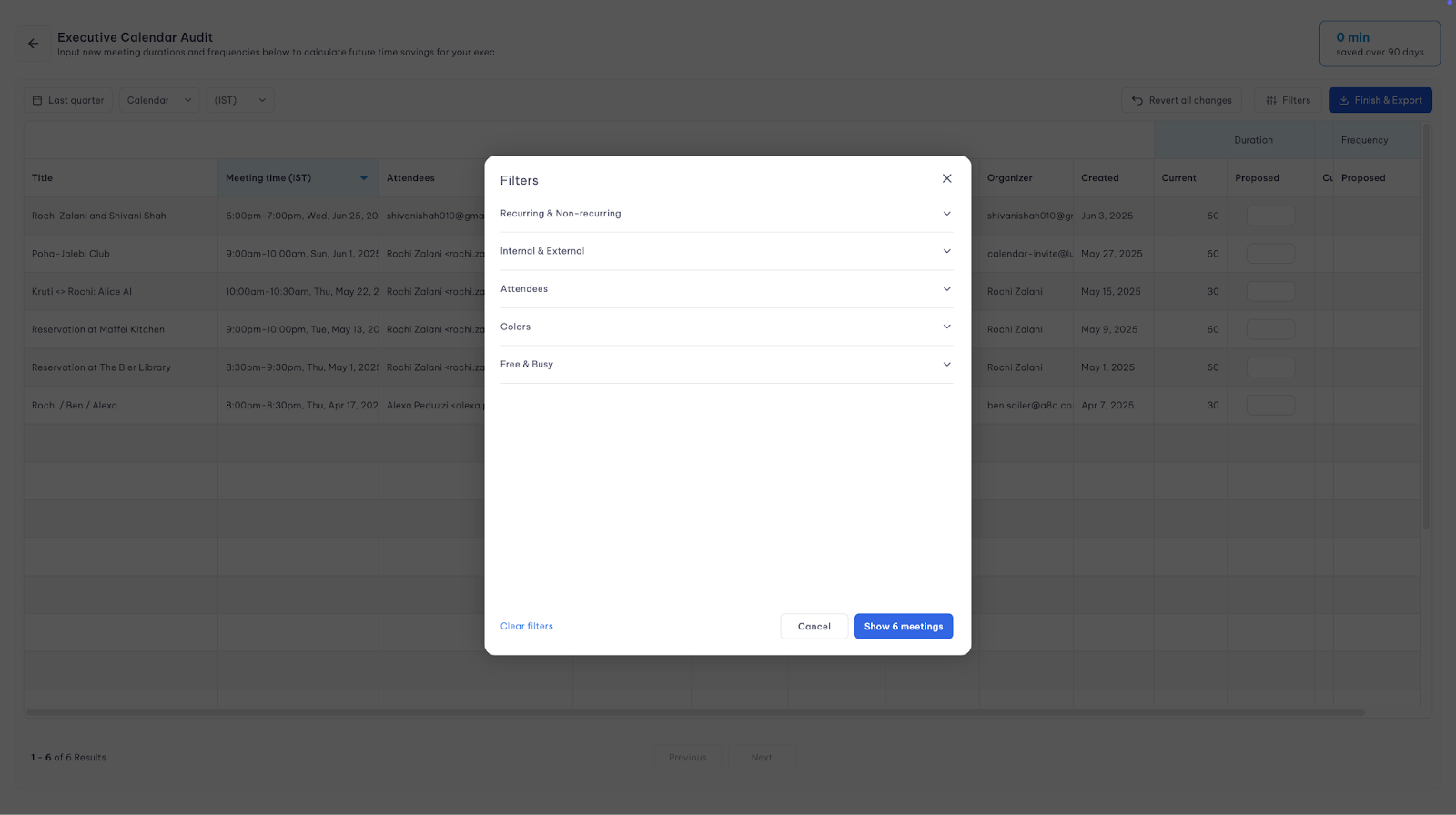
Manually, it’ll take you days, if not weeks, to collect all the data and categorize meetings. And honestly? It’s not the best use of your time when tools like Vimcal EA exist. You can automate the manual, tedious stuff and focus on what actually matters: conducting an audit that helps your execs focus on what matters most.
Whichever method you choose, once you measure how an exec has spent their time on various meeting categories, you can start spotting inefficiencies and patterns.
Step 4: Analyze the data from your audit
Okay, so now you know your exec is spending over 17 hours every week in external meetings. Now what? Raw data without analysis is just numbers in a fancy suit. Start with these questions:
- Is your exec’s calendar aligned with their goals and preferences? Check if the audit data reflects your exec’s aim and preferences that you set in step one.
If they wanted their Fridays to be as meeting free as possible for deep work, did that happen? If they wanted to show up in more 1:1s and in less large group meetings, did they accomplish that?
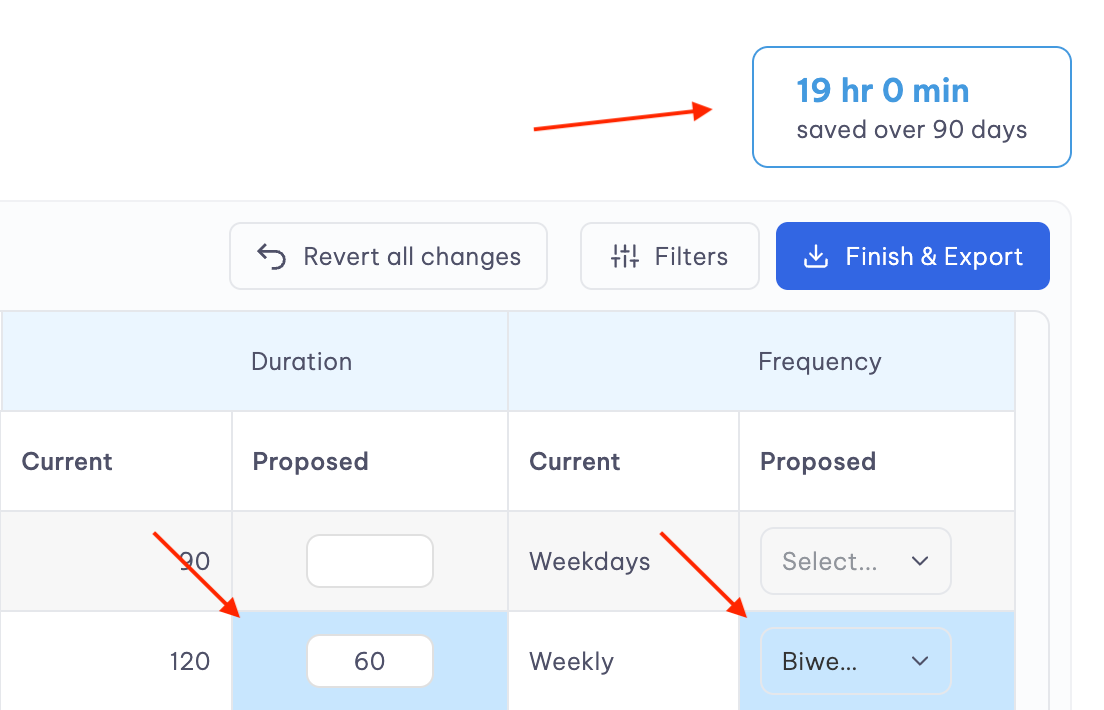
If they were short of meeting their goals, dissect why that happened: did an external event require tweaking their goals? Did they overschedule meetings? - Are there too many recurring meetings? Recurring meetings can often take up too much of your exec’s if you don’t monitor their need and efficiency regularly. Check how much time your exec spent in recurring meetings. How much time could they save if they cancelled one recurring meeting or cut it short?
If you’re using Vimcal EA, you don’t have to do this calculation manually. You can propose changes to your exec’s schedule and instantly see how many hours they’ll gain back if they implement your suggestions.
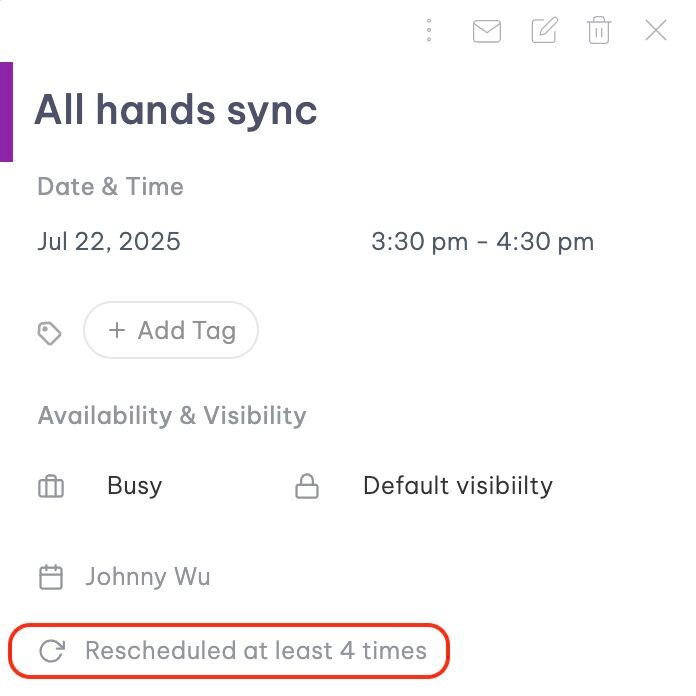
- Are there meetings which are rescheduled too often? If a meeting is rescheduled too frequently, inquire about its necessity with your executive.
For example, if a weekly 1:1 meeting is rescheduled frequently, it may work better as a fortnightly occurrence.
In Vimcal EA, you can view the reschedule history of a meeting, eliminating the need to search through email chains to confirm this data.
- In what ways can you make the calendar more efficient? Notice the little details and the context that can take an audit from good to great.
For example, is there too much time in between meetings to kill that’s also not enough to get any other meaningful task done? Are meetings clumped in the morning or evenings when your exec prefers them more spread out? Is there little to no personal time?
All of these things can help you find better ways to improve your exec’s calendar.
Once you’ve completed the analysis, you’ll have actionable takeaways like the following ready for your final audit report:
- [Exec name] spent 12 hours weekly in recurring internal meetings but only 3 hours a week in client-facing meetings. Since communicating with customers is a priority, I’ve suggested deleting one of these recurring meetings and reducing the length of 4 recurring meetings from 30 minutes to 15 minutes.
Find more such takeaways from your analysis that you can present to your executive (the final step!).
Step 5: Present and discuss the findings of your calendar audit
The ultimate goal of calendar audit is not just finding insights, but using them to make tangible changes in your exec’s schedule. Create a report that you can present to your exec and schedule time to discuss the findings. This could be a PowerPoint presentation, a PDF, or an email, whichever suits your style and aligns with your executive's preferences.
If you’re using Vimcal EA, exporting your insights into a report couldn’t be easier. You can download the file in CSV or PDF format and view a detailed report of your audit, as well as the impact of your proposed changes.
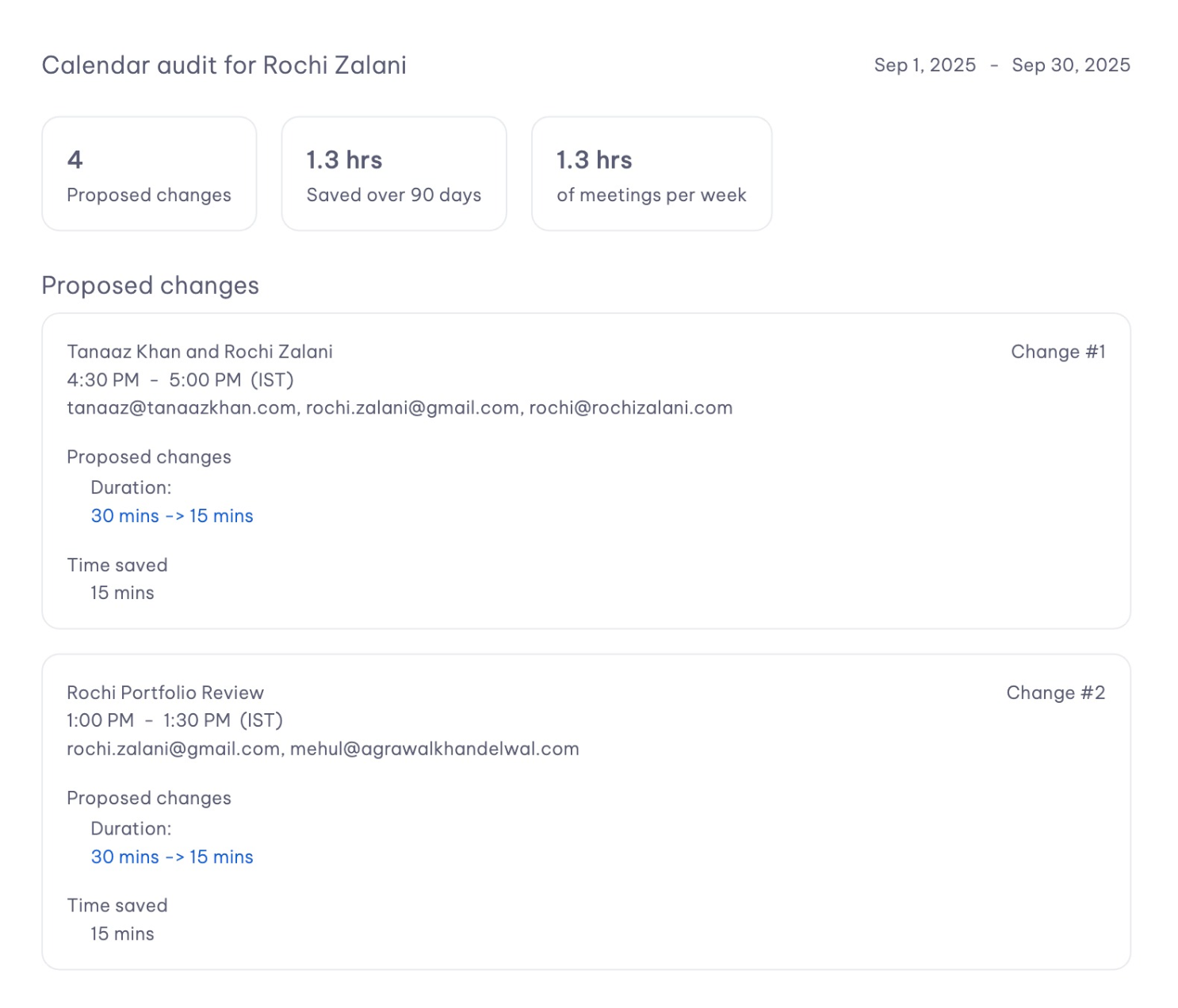
Your report should ultimately help your executive identify bottlenecks and understand why your proposed solution would work.
Show your exec how much time you can save them
Calendar audits are one of the best ways to help your exec spend their time more intentionally. It spotlights what's actually happening inside your exec’s calendar and your analysis will show what needs to change.
But doing this audit manually can be a slog. It might take so long that your valuable insights become irrelevant in the fast-paced environment. Take the grind out of the calendar using Vimcal EA. It does the audits in mere minutes so you can focus on actually helping your exec do their best work. Take a free demo, no strings attached.