




Pinterest is a visual discovery platform with over 4,000 full-time employees globally and 72 Executive Assistants across the business.
For Alissa, who supports Pinterest’s Chief Product and Technology Officer and helps lead its 27-person EPD admin team, scheduling is the connective tissue between executives, teams, and external partners.
Before Vimcal EA, communicating availability meant manually reading calendars, typing dates and times, calculating time zones, and coordinating through spreadsheets and long email threads.
With Vimcal EA, that changed. Alissa can now share availability in roughly 30 seconds instead of four to five minutes, offer dramatically more scheduling options, which makes it easier for people to find mutual time without another round of back-and-forth.
Testimonial
“Because it takes less effort on our part, we can be more accommodating and offer more time options. Scheduling flows so much better.”
— Alissa Colaizzi
The challenge: Manual scheduling limited how quickly others could find time
Before Vimcal EA, even a basic availability request required Alissa to manually translate what she saw on the calendar into an email or Slack message.
“Every time I had to type 'Tuesday, January 3rd at 11 AM Pacific', and then I had to remember 11am PST is 8pm in Zurich, and type it out. For years I kept thinking, there has to be a better way,” says Alissa.
For more complicated coordination, Pinterest’s EAs were manually creating Excel or Google Sheets, typing in options, or managing long email threads where people added and responded to times.
“We had been doing all of that so manually, literally creating an Excel or Google Sheet every single time and manually typing in the options and sending it out, or getting lost in these really long email threads of people adding times and then responding to times,” says Alissa.
The friction also created a less obvious bottleneck: when every additional time had to be typed manually, there was a practical limit to how much availability an EA would send.
How Vimcal EA helped Pinterest solve their challenges
1. Cutting availability sharing from 4–5 minutes to roughly 30 seconds
Slots was the feature that initially convinced Alissa to bring Vimcal EA to Pinterest, and it remains her favorite feature.
With Slots, Alissa can select the times she’s willing to offer directly on the calendar and paste the formatted availability into an email or Slack message, including the appropriate time zones.
She still keeps control over what actually gets offered.
“I like that I get to make the decisions. I know there are other platforms that would pick the times for you. I don’t want that. I want to make the decisions about what’s flexible and what’s not,” says Alissa.
Alissa estimates that sharing availability now takes roughly 30 seconds, compared with four to five minutes manually.
“That would have taken me so much time to type out and also to confirm that I was doing the time zone calculations correctly. If we timed how long that took, all combined, maybe 30 seconds?” says Alissa.
Asked how long the same workflow would have taken manually, she estimated four to five minutes. She does this at least 20 times in a typical week.
2. Offering 6x more availability without adding more work
The bigger change is what happens once adding another scheduling option takes almost no additional effort.
Before Vimcal EA, Alissa said she might offer around four times that she could make work. Now, because selecting another option is so easy, she can surface far more of her executive’s true flexibility.
“Before, maybe I offer only four times. Now, because sharing times is so much easier, I might offer 25 options,” says Alissa.
In one recent scheduling thread, she actually offered around 25 options to an external contact.
“They were like, ‘Wow, this is so helpful.’ They were so appreciative of how many options I gave. In that moment I was like, I would never have given that many choices before because it would have taken me too much time to type out for the next month,” says Alissa.
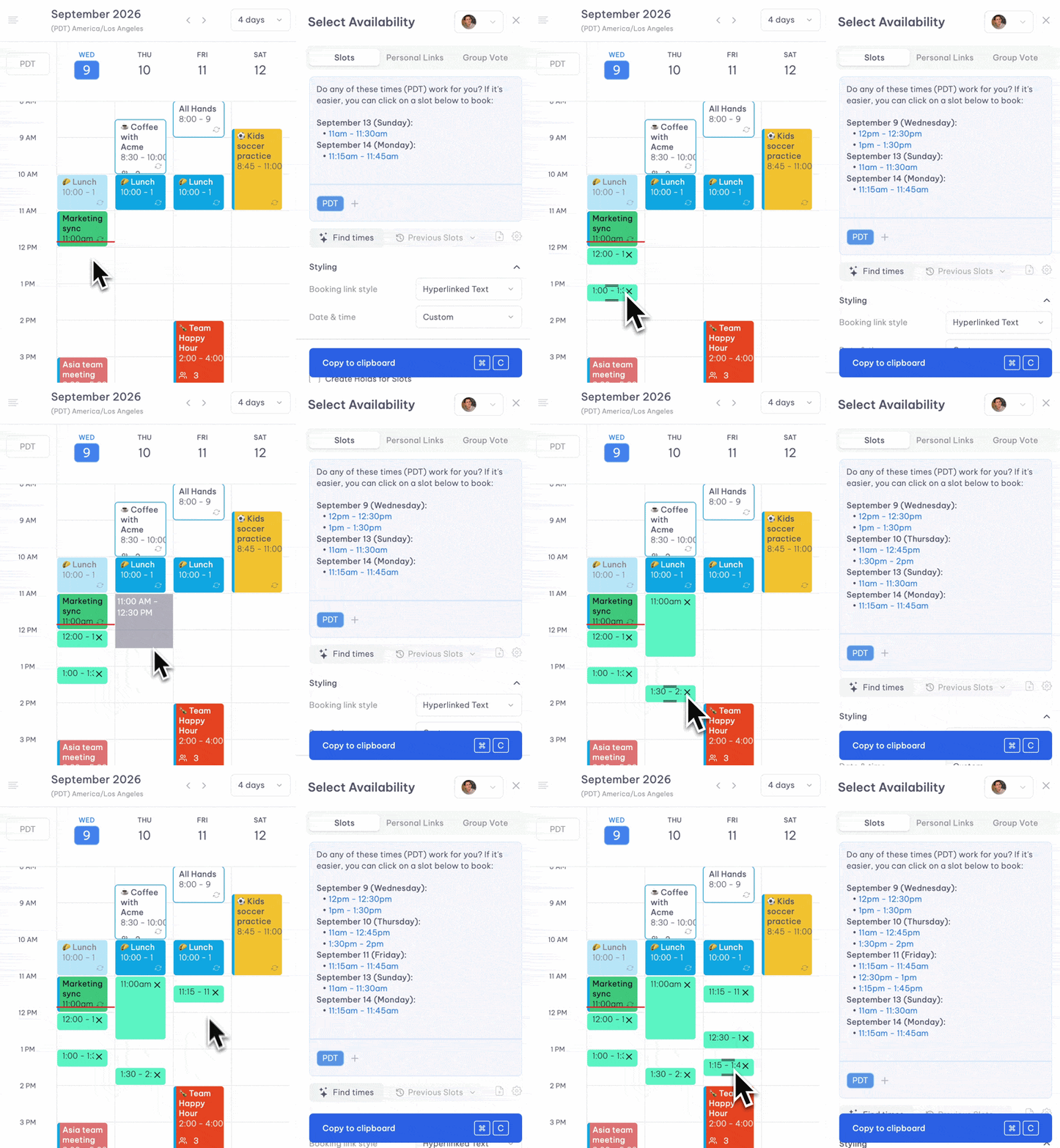
She also went from typically looking one or two weeks ahead to being able to offer a full month of availability at once.
“This takes me no more time to give them the next month worth of availability at one time,” says Alissa.
That makes it easier for the other person to find a time that works on the first exchange, reducing the amount of back-and-forth required to get important conversations on the calendar.
3. Reducing manual checking and scheduling errors
Free Time Finder became another unexpected favorite for Alissa.
When someone emails a list of available times, she used to keep the email and calendar open side by side and manually compare each option. Now, she can paste those times into Vimcal and immediately see them highlighted on the calendar.
“Being able to just copy it and paste it, it finds the times, highlights them, and then you just check the boxes and send it back. It simplifies the process so much and reduces the room for error,” says Alissa.
.gif)
The same reduction in manual work has improved accuracy.
“I don’t make any of those mistakes anymore. I don’t see those mistakes as often across the team either,” says Alissa.
The results of using Vimcal EA: Faster coordination with less friction
For Alissa, the benefit goes beyond spending less time on scheduling. Faster responses and more available options make it easier to find mutual time with fewer rounds of back-and-forth.
“The whole team is able to be even more flexible with calendars because they’re able to be more transparent about, well actually, I could make these ten times work,” says Alissa.
Vimcal EA also makes the inevitable scheduling interruptions far less disruptive. A request that previously pulled Alissa out of focused work for several minutes can now take seconds.
“There’s still all that context switching, but it takes about 10% of the time that it used to. It makes a big difference,” says Alissa.
That gives her more room for higher-focus work such as improving cross-functional operating rhythms and leading AI-enabled workflow adoption across the organization.
Moving forward with Vimcal EA
Vimcal EA has become part of Alissa’s everyday workflow.
When asked what would happen if Pinterest stopped offering it, her response was immediate: “I would cry.”
She also shared that another EA on the team had already decided what she would do if Pinterest ever stopped paying for Vimcal EA.
“One of the girls on the team was like, ‘If I have to pay out of pocket for this, if the company stops paying, I will pay with my own money to keep Vimcal,’” says Alissa.
