


Overview/Intro
Everest is a tech-enabled professional services company that pairs executives with dedicated assistants. Some assignments are full-time, one-to-one placements, while others are fractional, where a single assistant supports multiple clients across different organizations and time zones.
For Dino Miranda, Head of Executive Operations at Everest, that model creates a unique scheduling challenge. Her team of EAs don’t just manage one exec’s calendar. Instead, they manage dozens of calendars across companies, each with different tools, permissions, and time zones. Every scheduling interaction is external by default.
Before Vimcal, that meant a lot of manual work: opening time converter websites, typing in multiple cities, copying results back into emails, and hoping nothing slipped through the cracks. It was slow, repetitive, and prone to error.
After adopting Vimcal EA, Everest’s team reported daily time savings of 30 to 90 minutes per assistant, with 100% of pilot participants rating themselves satisfied or very satisfied. Scheduling became faster, more accurate, and, for the first time, fully embedded in the calendar itself.
Testimonial
[Quote box] “I've never seen another tool that can do what [Vimcal EA] does.”
— Dino Miranda
The challenge: Scheduling across clients, time zones, and tools that weren’t built for it
Everest’s EAs support clients across different organizations, each with their own tools, permissions, and preferences. That means every scheduling interaction is essentially external, and the margin for error is wide.
And before Vimcal EA, the process was entirely manual.
Some EAs on the team used different polling tools to make group scheduling easier. But for day-to-day calendar work, the workflow was the same:
- open a time converter website
- check the cities
- check the dates
- copy the results
- paste them into an email
- hope you got it right
The problem wasn’t just that it was time-consuming, but it also left a lot of room for error. Time zone math is deceptively tricky, especially when you factor in daylight saving changes and the sheer volume of scheduling requests an EA handles in a day.
And for a team like Everest’s, where each EA might be scheduling across several clients in different regions on any given day, the chances of something slipping multiply fast.
“[Manual time zone conversion] can possibly be inaccurate. You can go to a time converter [site], but if you don’t check the actual day that you’re looking at, you might miss something like a time change.”
For a company whose entire value proposition is making executives more effective, a scheduling mistake can undermine the trust that Everest’s model depends on.
And because Everest’s EAs support external clients, they can’t require those clients to install new software or change how they work. Any tool the team adopts has to work without putting any burden on the people they support.
The team needed a tool that could consolidate time zone conversion, availability sharing, and hold management into one place, without requiring a single thing from the execs on the other end.
How Vimcal EA helped Everest tackle its challenges
Everest needed a tool that could keep up with the complexity of their model without adding friction for the clients they support. Here’s what changed with Vimcal EA.
1. Replacing scattered tools with Slots
Before Vimcal, proposing times meant toggling between a time converter, a calendar, and an email draft. Slots collapsed all of that into one action: drag to select availability, and Vimcal generates hyperlinked time options the recipient can click to book.

For Dino, this was the standout feature from the moment she saw the product.
“I think Slots is the feature that everybody uses the most, especially because there’s always so much back and forth. The ability to be able to have [available times] hyperlinked and for someone to just be able to click on them is amazing.”
After a group pilot, we found Slots was the most widely used feature, with some EAs saving up to 45+ minutes per day on availability sharing alone. Most also reported that Vimcal EA reduced the back-and-forth required to schedule meetings.
2. Cutting out the busywork of hold management
Proposing times is only half the job. Every time slot an EA offers also needs a hold on the exec’s calendar to prevent double-bookings. And once a meeting is confirmed, all the unused holds need to be cleaned up.
Before Vimcal, that was all manual: create holds one by one, then go back and delete them one by one.
With Vimcal EA, holds are created automatically the moment you select availability through Slots. When a time is booked, the remaining holds are deleted without the EA touching anything.
It sounds like a small thing, but it adds up fast when you factor in dozens of scheduling requests a day. Everest’s EAs saved 20+ minutes per day on hold management alone.
3. Eliminating time zone errors with Time Travel
Accuracy was the pain point Dino kept coming back to. One wrong time zone conversion and the meeting falls apart, which is especially costly when you’re scheduling on behalf of a client.
Vimcal EA’s Time Travel feature displays multiple time zones simultaneously in a stacked view, so overlapping work hours are visible at a glance. When proposing times through Slots, the text is automatically formatted in whichever time zone you select, so the recipient sees times in their local zone without the EA doing any manual conversion.

For a team whose workflow is external by default, where they can’t control what tools the other party uses, having time zone intelligence built into the calendar itself removed an entire category of risk.
4. Coordinating large group meetings without the back-and-forth
Whenever Everest’s EAs need to coordinate a board meeting, an offsite, or any gathering where multiple people need to weigh in on timing, the back-and-forth multiplies fast.
Before Vimcal EA, some EAs on the team used a standalone tool to handle this. It worked, but it was another separate tool outside the calendar.
Vimcal EA’s Group Spreadsheets feature brings that functionality directly into the calendar. You create a set of options, share a link, and participants vote on which time works. You don’t need a separate tool, an extra tab, or copy results back into an email.
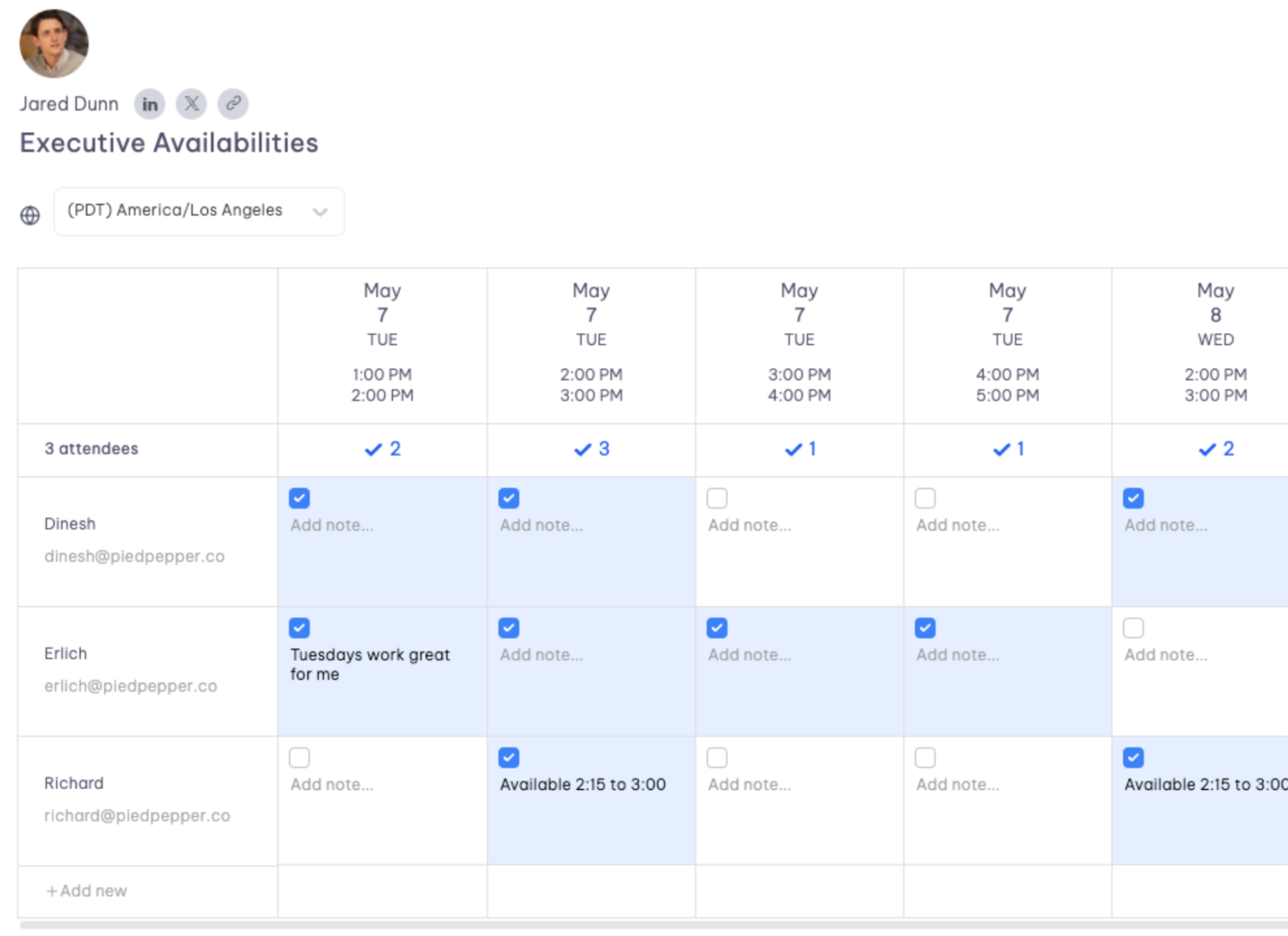
Everest EAs saved an average of ~30 minutes per day using Group Spreadsheets, with one saving over an hour.
5. Replacing hours of spreadsheet work with Calendar Audit
Dino had spent years manually auditing executive calendars. Opening a calendar, copying meetings into a spreadsheet, categorizing patterns, and then sitting down with the exec to review where their time was going.
Vimcal EA’s Calendar Audit feature automates that entire process. It analyzes meeting patterns and surfaces where time is going, so EAs can have those conversations with their executives without spending hours on data entry first.
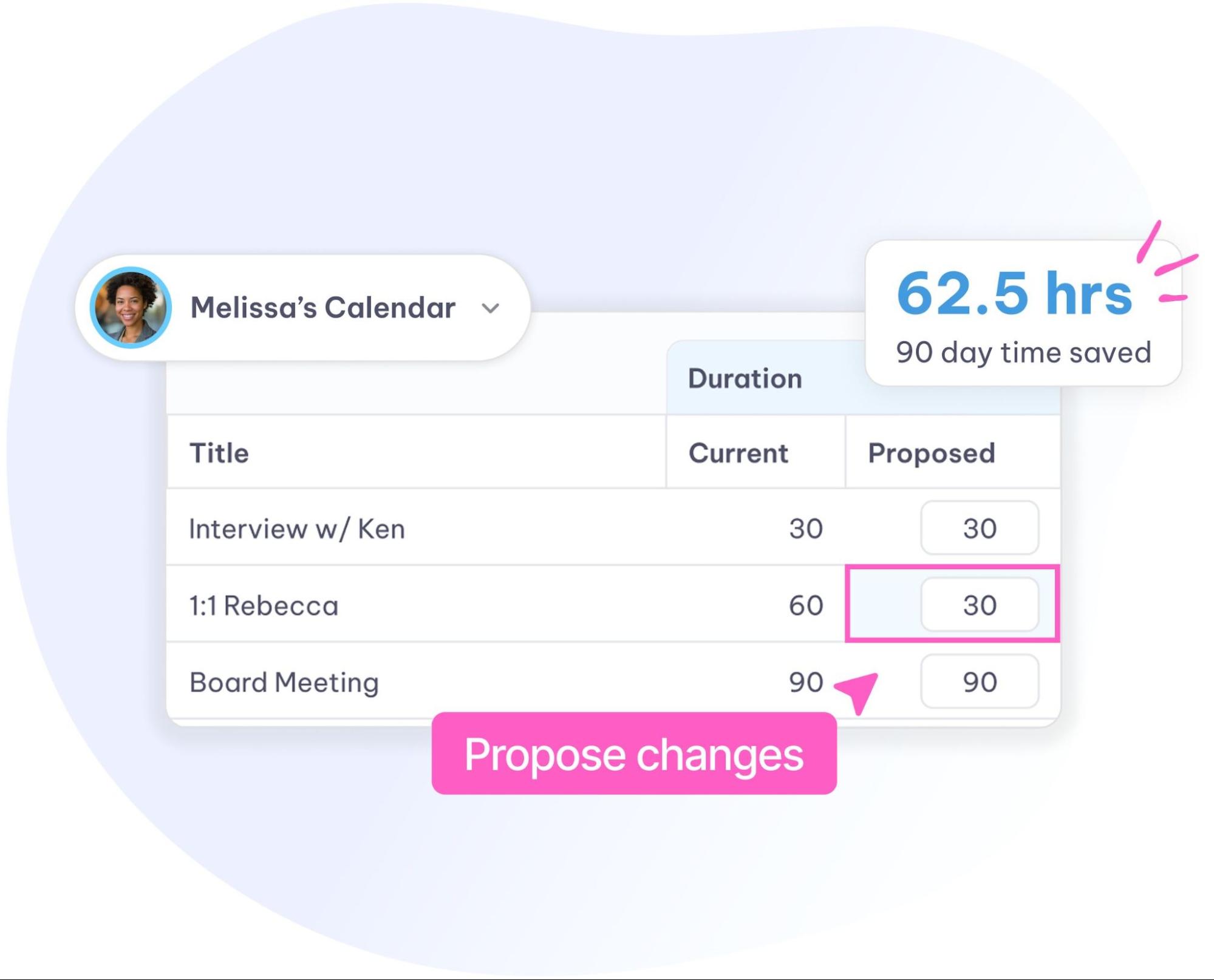
The EAs at Everest who used the Calendar Audit feature saved between 15 minutes and an hour per audit. For Dino, this was the moment Vimcal EA became more than just a scheduling tool.
The results of using Vimcal EA: 30 to 90 minutes back every day
After the pilot, the numbers told a clear story. All participating EAs reported being satisfied or very satisfied with Vimcal EA. All EAs said they were confident or very confident about continuing to use it. And daily time savings ranged from 30 to 90 minutes per assistant, depending on workflow.
But for Dino, the results go beyond time saved.
[Quote box] “[Vimcal EA] has made us faster, better, and [helped us] work smarter, for sure.”
Speed and accuracy together is what makes Vimcal EA particularly valuable for EAs, especially in Everest’s model.
When your EAs support external clients across different companies and time zones, a scheduling mistake doesn’t just waste 15 minutes; it also reflects on Everest as a business. Vimcal EA reduced that risk while giving EAs more time to focus on higher-value work.
Moving forward with Vimcal EA
Everest’s model is different from a typical in-house EA setup. Their assistants work across multiple clients, multiple organizations, and multiple time zones, all without being able to require anything from the people they support. Vimcal EA fits that model because it works entirely on the EA’s side.
For a company built on making executive support smarter and more proactive, Vimcal EA gave Everest’s team exactly what they needed: a faster way to work that doesn’t sacrifice accuracy.
