




Vimcal is a recommended tool in Clay's internal operating manual.
Clay takes innovative go-to-market ideas and helps businesses scale them. It’s a flexible, AI-driven platform that pulls data from 150+ sources and lets teams orchestrate it. Teams use Clay to run outbound, inbound, and creative go-to-market plays, all in one place.
And the company is on a rapid rise. For Executive Assistants Kayleen Veatch (supporting CEO Karim Amin) and Tess Hokin (supporting co-founder Varun Anand), that growth meant an unsustainable scheduling burden. The manual work (retyping times into emails, calculating time zones, creating and deleting holds) was where mistakes happened and hours disappeared.
Then they discovered Vimcal EA. Within weeks, both EAs reclaimed over an hour daily, eliminated their scheduling backlogs, and could finally keep pace with Clay's explosive growth.
“I honestly don't know if I could do the job without Vimcal. I'm sure I could struggle through it, but I really don't know if I could work at this pace with this much scheduling.” — Tess Hokin
The challenge: Hitting the ceiling with traditional calendaring
Kayleen had been calendaring using Google Calendar manually and moving at whip speed. But as Clay's growth accelerated, that speed wasn't enough. She found herself with dedicated afternoon scheduling blocks just to process requests. And even then, she was struggling.
Looking at the calendar, mentally noting times, switching to email, retyping those slots: this workflow consumed massive amounts of time and created constant opportunities for mistakes.
And these potential mistakes became a source of anxiety.
“As an EA, whenever you make a mistake, it undermines your credibility and the trust that your exec has in you,” says Tess.
Both EAs also manage schedules across multiple time zones, handle heavy external scheduling with customers and partners, and need to move fast to support executives whose buy-in is required across the majority of the business.
The existing tools (Google Calendar and Outlook) simply weren't built for the volume and complexity they faced daily.
How Vimcal EA helped Clay solve their challenges
Kayleen and Tess faced challenges that are at the heart of what every EA faces. And Vimcal EA is specifically designed to tackle these problems. Here’s what the Clay EAs achieved with Vimcal:
1. Eliminating the retyping hassle (that costs hours daily)
Both Kayleen and Tess immediately identified Slots as their favorite feature because it eliminated the most tedious, error-prone part of their workflow.
“Slots is like having a little magic wand,” says Tess.
With Slots, you can visually drag time blocks across your calendar to select availability. Then, copy them to your clipboard in perfectly formatted text, complete with time zones.
Vimcal EA also remembers your last selection, so if you realize you need to switch time zones or made a mistake, you can instantly pull up those same slots without recreating them.
For both Kayleen and Tess, Slots removed the primary source of errors and time waste.
“I think Slots is where you've given me my life back. It's the magic of not typing in all of these times into an email body manually. It's incredible,” says Kayleen.
2. Automating hold management to prevent scheduling conflicts
Smart holds in Vimcal EA work in tandem with Slots. When you drag to select availability to send to someone, Vimcal automatically creates calendar holds for those time slots. You can pre-fill meeting details (title, location, attendees) that will auto-populate when the meeting is confirmed.
Then, when someone books one of those slots (whether through a booking link or by replying to your email), Vimcal automatically deletes the holds for the times that weren't selected.
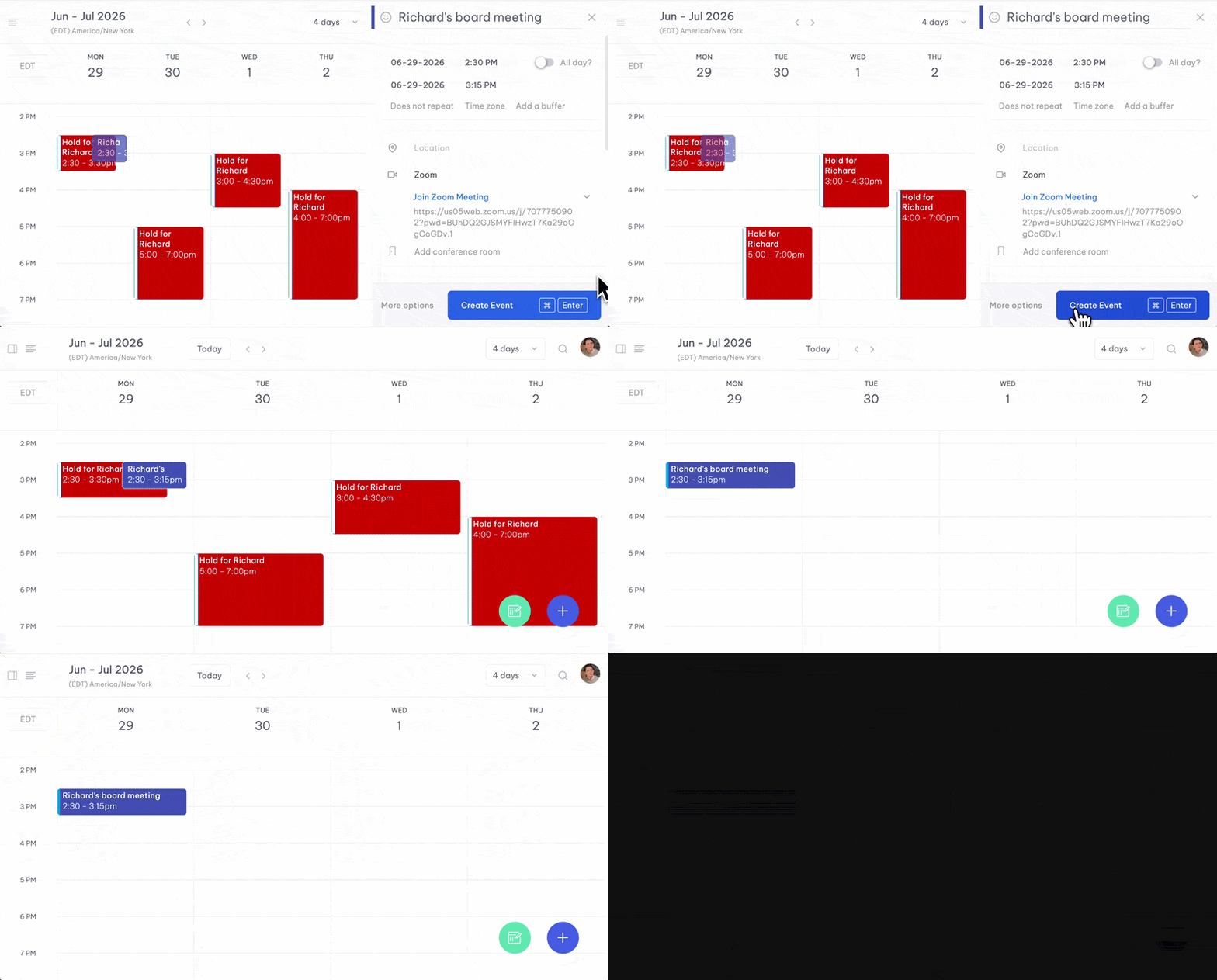
This eliminates what used to be one of the most tedious parts of an EA’s work: manually creating holds when proposing times, then manually going back in to delete the ones that weren't chosen.
“The fact that Vimcal puts all the holds on at the same time and then it deletes all of them when a meeting is confirmed…that’s the real clutch,” says Tess.
Before Vimcal EA, proposing times with holds could take 77 clicks. With smart holds, it takes 8.
3. Removing mental math from multi-timezone scheduling
Vimcal EA displays multiple time zones simultaneously in a stacked view, so you can see overlapping work hours at a glance.
When scheduling meetings, you can instantly switch between time zones with a single click. This means no more Googling “PST to London” or counting hours in your head.
The Slots feature automatically formats times in whichever time zone you select, so when you're proposing times to someone in a different zone, the text you copy is already in their local time.
“[While scheduling meetings], I'm thinking, ‘oh, I should put this in their time zone, not ours. Let me go back and fix it,’ And I open Vimcal and boom, it's right there in their time zone already. I don't have to recreate anything,” says Tess.
Since Tess and Kayleen both manage executives who travel constantly and coordinate with global teams, Time Travel eliminates a major source of potential errors.
The results of using Vimcal EA: Speed, accuracy, and trust
Tess and Kayleen both save at least an hour every day, thanks to Vimcal EA.
To put things into perspective, Tess highlighted how she got through 50 non-urgent emails in just a single afternoon after returning from her three-week Europe trip with her executive. A task that would take her 3 whole days without Vimcal EA.
“I got through all 50 of those emails in one afternoon. That would have taken me at least three days to clear everything thoughtfully just because of the mental overload of it,” says Tess.
Using Vimcal EA also helped Tess reduce her worries around managing her exec’s calendar. With the tool, she could sleep peacefully knowing everything is accurate and efficient.
“I usually feel a lot of overwhelm or anxiety or stress around the calendar. And I think Vimcal is probably the maximum amount of stress that a tool could take away from that. I can trust that a large part of the guesswork and the double checking is already done.”
This combination of speed and accuracy also improved the executive relationship for both EAs.
“Vimcal allows me to make fewer mistakes, which further allows me and my exec to have more trust in each other. The relationship is stronger. He's able to delegate more. I'm faster. He's faster,” says Tess.
Kalyeen echoes this:
“I'm much quicker, which makes him quicker, and I'm less stressed, which makes me more effective.”
Moving forward with Vimcal EA
Kayleen and Tess continue to rely on Vimcal EA themselves and recommend it to other EAs, too. When asked whether she’d recommend Vimcal EA to other executive assistants, Kayleen's answer was immediate: “Yes, immediately. I would say I didn't use Vimcal for a long time and now I feel very silly about that.”
For two EAs supporting a company in hypergrowth, Vimcal EA made their jobs easier and more efficient, with zero room for error. An hour back every day. Backlogs cleared in an afternoon instead of days. Fewer mistakes, stronger trust, better relationships with their executives.
As Tess puts it: “Vimcal is how in my head calendaring should work.”
